NBA 2K Twitch Drops: How to Get Free Rewards – GameWilds
NBA 2K Twitch Drops explained. Learn how to link your account, watch eligible streams, claim rewards, and fix NBA 2K Twitch Drops not working issues.
Table of Contents
NBA 2K Twitch Drops are time-based rewards you earn by watching Drops-enabled NBA 2K26 streams on Twitch. Look for the “Drops enabled” badge, hit watch milestones (like 30/60/90 minutes), then claim each tier in your Twitch Inventory within 24 hours. Log into the NBA 2K Drops page with the same Twitch account, wait up to 48 hours for Locker Codes, and redeem them in MyCAREER, MyTEAM, or the MyNBA2K app. Link accounts first and watch for typical rewards like packs, boosts, and VC—here’s how it all works.

What Are NBA 2K Twitch Drops?
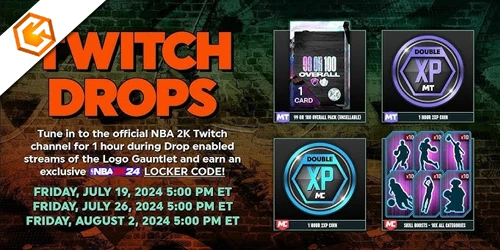
NBA 2K Twitch Drops are time-based rewards you earn by watching eligible NBA 2K livestreams on Twitch during active Drops campaigns. You’ll see a Drops notification in chat; watch until you hit set thresholds (like 30, 60, or 90 minutes) to access nba 2k twitch rewards such as 2XP coins, MyTEAM packs, Free Agent cards, or Skill Boosts. After each tier, claim the Drop in your Twitch Inventory within 24 hours. Then wait—each tier issues a separate Locker Code that may take up to 48 hours to appear on the NBA 2K Drops page.
To receive items in NBA 2K26, link 2k account to twitch and redeem codes in MyCAREER, MyTEAM, or the mobile app. If you see nba 2k drops not working, confirm stream eligibility, account links, claims, and timing.
How to Get NBA 2K Twitch Drops
Start by finding eligible streams—look for the “Drops enabled” badge on Twitch while a campaign is live—then watch until you hit the posted milestones (like 30/60/90 minutes). When you complete a tier, open your Twitch Inventory and claim it within 24 hours to stay eligible for nba 2k free rewards. Next, sign in to the official NBA 2K Twitch Drops page with the same Twitch account. Allow up to 48 hours for your Locker Code to populate, then redeem it in NBA 2K26 or the MyNBA2K app using your linked game account. Only active campaigns grant nba 2k26 twitch drops, so check dates.
- Verify the stream title/panel shows Drops and the current campaign.
- Track progress via the Twitch Drops overlay.
- Claim each Drop tier promptly.
- Redeem codes in MyCAREER or MyTEAM menus.
How to Link Your 2K and Twitch Account
Link your accounts in minutes so Drops you earn actually reach your game. Go to the NBA 2K Twitch Drops page (https://nba.2k.com/twitch-drops) and click “Login To Twitch.” Sign into the same Twitch account you use to watch Drops-enabled streams. When prompted, sign in to your 2K Account (or create one) using the same email/credentials so both profiles connect correctly.
Make sure the Twitch account you link is the exact one you’ll use to claim Drops; claims are tied to that specific Twitch account and must match on the 2K Drops page. After you claim a Drop in your Twitch Inventory, allow up to 48 hours for a Locker Code to appear on the 2K Drops page. If nothing shows, contact 2K Support with your Twitch username. Finally, launch NBA 2K26 once and finish 2K Account setup.
NBA 2K Twitch Drops Rewards List
Typically, each NBA 2K Twitch Drop tier releases a specific reward as you hit watch-time milestones—think 30, 60, and 90 minutes—each issuing its own Locker Code after you claim on Twitch. You’ll see tiered rewards like MyTEAM packs, event cards, 2XP coins, MyCAREER Skill Boosts, and sometimes VC (for example, 10,000 VC at 90 minutes). Claim each Drop in your Twitch Inventory within 24 hours, then give it up to 48 hours for the Locker Code to post on the NBA 2K Twitch Drops page. Redeem in NBA 2K26 via MyTEAM (Market > Locker Codes), MyCAREER (Options/Quit), or the MyNBA2K app. Codes aren’t case-sensitive but require hyphens.
- 30 minutes: MyTEAM pack or 2XP coin
- 60 minutes: Skill Boosts or event card
- 90 minutes: High-OVR Free Agent + 10,000 VC
- Bonus tiers: rotating MyTEAM packs or 2XP coins
Why NBA 2K Twitch Drops Not Working
If your NBA 2K Twitch Drops aren’t showing up, first confirm you watched an eligible Drops-enabled stream during an active campaign and claimed the Drop in your Twitch Inventory within 24 hours. Watching non-Drops streams doesn’t count, and unclaimed Drops expire.
Next, make sure the Twitch account you used to claim the Drop matches the one you used to log into the NBA 2K Drops page. Mismatched accounts are a common reason codes don’t appear.
If you did everything right but don’t see a Locker Code, wait up to 48 hours for processing. This propagation delay is normal. Still missing after 48 hours? Contact 2K Customer Service and include your Twitch username.
Finally, once the code appears, redeem it in-game or in the companion app within the campaign window.
Frequently Asked Questions
How to Get NBA 2K Twitch Drops?
You get them by watching Drops-enabled streams, hitting watch-time tiers, and claiming Drops in your Twitch Inventory. Link Twitch to your 2K account, wait up to 48 hours for a Locker Code, then redeem it in-game or the app.
Conclusion
You’ve got everything you need to turn watch time into real NBA 2K rewards. Spot Drop-enabled streams, hit the time milestones, and claim your loot in Twitch Inventory. Link your Twitch and 2K accounts, redeem the Locker Code fast, and you’ll boost MyCAREER and MyTEAM with XP, boosts, and packs. Keep an eye on campaign windows, track progress, and troubleshoot quickly if rewards don’t appear. Stay consistent, stack drops across events, and you’ll never miss a free upgrade.