Clash Royale Emotes Guide: How to Get & Use Emotes – GameWilds
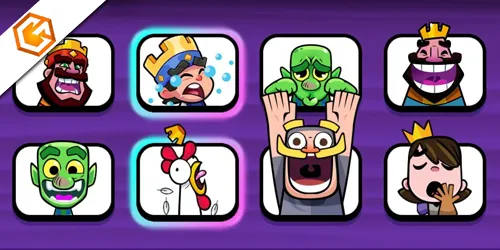
Clash Royale emotes guide explaining how to unlock emotes, earn free emotes, use them in battles, and understand emote rarities and bundles.
Table of Contents
Whether you’re flexing a Legendary animation or sending a quick “Good luck,” emotes shape how you communicate in Clash Royale. You’ll find them in the Shop, events, Pass Royale, and even creator links—but not all are permanent, and some are easy to miss. Setting up an Emote Deck, timing your taunts, and avoiding spam can give you an edge and keep things respectful. Want the smartest pickups and the best options for 2025?
What Are Clash Royale Emotes?
In Clash Royale, emotes are quick, in-battle expressions—animated stickers with sound or simple Taunt text bubbles—that let you react, congratulate, or communicate without chat. You’ll see them play beside your King’s Tower; opponents hear animations, while spectators get smaller, silent versions. You can send a lot, but there’s a limit per match and short delays between sends.
Clash royale emotes come in three forms: Regular (standard), Exclusive (time-limited with a Legendary border), and Taunts (text-only). Six English Taunts are always available: “Good luck!”, “Well played!”, “Wow!”, “Thanks!”, “Good game!”, and “Oops.” Trainers may use custom lines.
If you’re wondering how to get clash royale emotes, you’ll learn shop, event, and reward sources next. You can also mute emotes anytime using the toggle near your Emote Deck.

Types of Clash Royale Emotes
Now that you know what emotes do, it helps to sort them by type. On your clash royale emotes list, you’ll see three categories: Regular, Exclusive, and Taunts. Regular are the core clash royale animated emotes with sound, shown beside your King’s Tower; they’re usually purchasable or earnable again later. Exclusive emotes carry a Legendary border (added Apr 16, 2019) and often never return after their window. Taunts aren’t animated; they’re battle-only text bubbles with six stock phrases.
| Type | Visual/Audio | Availability |
|---|---|---|
| Regular | Animated + sound | Common via shop/rewards |
| Exclusive | Animated + sound + Legendary border | Time-limited, often unreturning |
| Taunts | Text-only bubbles | Default, always available |
| Spectator View | Smaller, silent | Mirrors player use |
| Notes | Some Regulars debut limited | Some exclusives tied to actions (e.g., SCID) |
How to Use Emotes in Clash Royale
Often the quickest way to speak without words, emotes let you react mid-match and between plays. Tap the ellipsis speech-bubble at the bottom-left to open your Emote Deck, then tap any tile to fire its animation and sound beside your King’s Tower. Taunt emotes send as simple text bubbles; Regular and Exclusive emotes animate and play audio.
Customize an 8-slot Emote Deck from Cards → speech-bubble tab, and open your full collection from the deck to send any owned emote. Use the clash royale emotes mute toggle to manage noise or tilt: the icon left of the deck switches between 🚫 and a green check, blocking seeing, hearing, and sending. Remember the send limit (about 100 per match) and brief delays that reduce spam. Be positive and respectful. This clash royale emotes guide favors sportsmanship.
How to Get Clash Royale Emotes
Ready to expand your emote toolbox? You’ve got several reliable paths. Check the clash royale emotes shop daily—three random non-Exclusive picks usually cost 250 Gems each, and Daily Deals sometimes discount them. Progress on Pass Royale and Trophy Road to unlock milestone emotes (several pop up around 2200, 4000, and higher). Chase event rewards: special challenges, seasonal roads, and 3-Star Lucky Chests often drop emotes. Watch for Exclusive releases (Legendary border) tied to events, creator tournaments, top Global placements, or limited IAP bundles. Don’t miss freebies: connecting Supercell ID once granted the Legendary Chicken, and occasional QR/creator links deliver gifts.
| Source | What to expect |
|---|---|
| Shop/Daily Deals | Standard pool |
| Pass Royale | Seasonal unlocks |
| Trophy Road | Milestone emotes |
| Events/Challenges | Exclusives/prizes |
| Creator links/QR | Free drops |
Hunt clash royale rare emotes during limited-time events.
Clash Royale Emotes List
Next, you’ll scan the Clash Royale Emotes List so you can spot the basics, the flashy animated sets, and the hard-to-get specials. You’ll see which standard reactions cover your core needs, which animated or sound-enhanced emotes add personality, and which limited-time pieces you shouldn’t miss. Use this breakdown to plan your Emote Deck and wishlist smartly.
Basic Clash Royale Emotes
Kick off your emote journey by learning the basics: Clash Royale groups emotes into Regular, Exclusive, and Taunts. Regulars are the standard animated icons you’ll see daily. Exclusive emotes (Legendary border) are time-limited and tied to Pass Royale, events, or promos—think Supercell ID’s chicken. Taunts are text-bubble-only with no animation or sound.
Access your full collection from the Cards section’s speech-bubble tab, then build an 8-slot Emote Deck for battles. You can send up to 100 emotes per match, but the Champions Update added a longer delay to curb spam. Can’t find a favorite? Favorite it anyway to add it to your wishlist and get Shop alerts.
- Check daily Shop deals for Regulars (~250 Gems)
- Track “clash royale emotes 2025” rotations
- Avoid “clash royale emote codes”; use official sources
Animated & Special Emotes
You’ve set up the basics, so let’s focus on Animated and Special Emotes you’ll actually use mid-match. Animated Emotes are your standard short animations with sound that pop beside your King’s Tower. Add up to eight to your Emote Deck for quick taps that celebrate a clutch defense or acknowledge a smart play. Exclusive Animated Emotes carry a Legendary border and are tied to limited windows—Pass Royale tracks or top Global Tournament rewards—so once they’re gone, they’re gone.
Taunts are different: they’re text bubbles with no sound, and certain characters have custom lines beyond the six default English Taunts. You can buy non-Exclusive emotes in the Shop, or earn them through events, Trophy Road, creator tournaments, or Supercell ID perks.
| Type | Key Trait | Where to Get |
|---|---|---|
| Animated | Short animation + sound | Shop, events |
| Exclusive Animated | Legendary border | Pass, tournaments |
| Taunt | Text bubble, no sound | Default/custom |
| Spectator Emotes | Smaller, muted | Viewers |
| Emote Deck | Up to 8 slots | Collection screen |
Limited-Time Emotes
Ever wonder why some emotes flash a golden frame and vanish after a season? Those are Exclusive, limited-time Emotes with a Legendary border (added Apr 16, 2019). You can only earn them during their window—once it closes, you can’t buy them later unless Supercell reruns them. They commonly appear in Pass Royale tracks, Global Tournament Top‑100 rewards, creator tournaments, seasonal events, or anniversary promos. Some releases are “partial exclusives” without the border—they debut in limited offers, then may enter normal Shop rotation later.
- Track Pass rewards, Daily Deals, and event tabs; favorite any target Emotes so you don’t miss them.
- Follow official announcements, creator codes, and partner events for drops and QR/ID bonuses.
- Act fast—missed Exclusive Emotes usually don’t return.
Clash Royale Emote Codes Explained
While most Clash Royale Emotes come from the Shop, events, or season rewards, emote codes offer occasional free unlocks through limited-time promo strings or QR links. These promos, like WHENHOGSFLY, typically grant one specific Emote and expire after the campaign. They’re permanent once claimed, but you must redeem them before the deadline.
Here’s how it works: when Supercell enables the redemption interface, enter the code or scan the QR while logged into your account. QR drops and special links have been common since 2024, especially at events or through creator promotions. Codes are supplemental, not a main source—most Emotes still arrive via Shop rotations, Trophy Road, Pass Royale, and tournaments. You can favorite Emotes to get notified when they appear, but wishlisting doesn’t auto-claim code rewards.
Best Clash Royale Emotes in 2025
From ranked ladder to Party Mode, the “best” Clash Royale emotes in 2025 blend versatility, timing, and a dash of rarity. You’ll get the most mileage from emotes that communicate intent fast and fit multiple moments. King Thinking signals hesitation or a tough decision, while Cheer Knight delivers clean support after clutch defenses. Laughing King still rules post-victory taunts—use sparingly to avoid toxicity.
Best 2025 emotes: versatile, fast, and rare—Think, Cheer, Laugh; communicate, support, and celebrate wisely.
- King Thinking, Cheer Knight, and Laughing King: staple reactions for decisions, encouragement, and swagger.
- Cursed Hog Booty Dance: cheeky and infamous after a tower drop or flawless Hog push.
- Pawning Princess and Little Prince Crying: subtle sarcasm, mock-sad beats; favorites on streams.
Prioritize versatile emotes with exclusive borders. In casual modes, lean Cheer Knight/Pawning Princess; on ladder, save provocative picks for decisive moments.
Frequently Asked Questions
Can I Disable or Mute Opponent Emotes During Matches?
Yes, you can. Tap the chat bubble during a match and toggle emotes off, or disable them in Settings. You’ll still see your own emotes, but opponents’ are muted, keeping focus and reducing distractions.
Do Emotes Provide Any Gameplay Advantages or Buffs?
No, emotes don’t grant gameplay advantages or buffs. You use them purely for expression and communication. They won’t affect damage, elixir, cycle, or tower health. If they distract you, mute them and focus on strategy.
How Do I Report Toxic Emote Behavior or Harassment?
Report toxic emotes by tapping the opponent’s name post-match, selecting Report, and choosing Harassment/Toxic Behavior. You can mute emotes mid-battle via the speech bubble icon. Provide screenshots or timestamps. Repeat offenders face chat bans or account penalties.
Are Emote Purchases Shared Across Devices or Accounts?
They’re tied to your Supercell ID account, not individual devices. You can switch devices and keep purchased emotes. You can’t share emotes across different accounts. Log into the same Supercell ID on each device to access everything.
Can I Customize the Emote Wheel Layout per Deck?
No, you can’t set a unique emote wheel per deck. You can edit one global wheel in your Emotes collection. Rearrange slots, swap emotes, and save. That layout applies to all decks and modes.
Conclusion
You’ve got everything you need to flex your personality and sharpen your communication in Clash Royale. Build a balanced Emote Deck, time your reactions, and avoid spamming to keep things classy. Pick up new emotes from the Shop, Pass Royale, Trophy Road, events, creator links, and promos—especially those limited Legendary drops. Use emotes to signal, celebrate, or defuse tilt. Mute when needed. Master your messages, and you’ll win hearts—and sometimes crowns—alongside your matches.