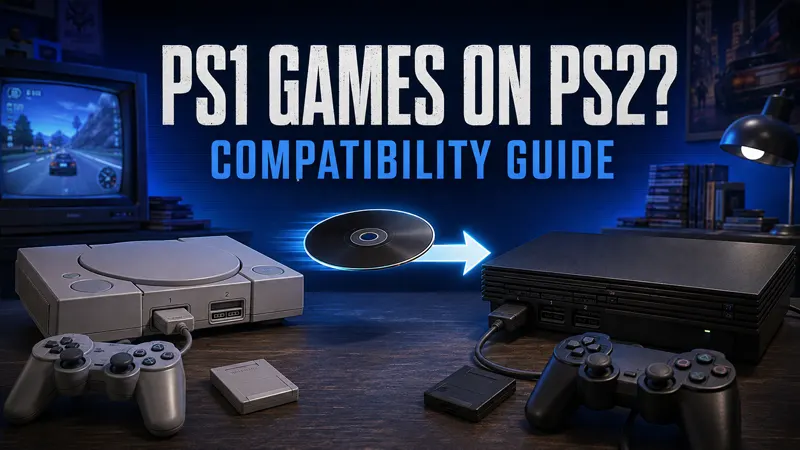
Can you play PS1 games on PS2? Yes. The PlayStation 2 was designed to run original PlayStation-format game discs, so most genuine PS1 discs work when inserted into a compatible PS2 from the same region. You will normally need a PS1 memory card to save progress, even though you are playing on a PS2.
This complete compatibility guide explains which discs, memory cards and controllers work, how to start a PS1 game, what changes between PS2 models and how to fix common disc-reading problems without modifying the console.
Can you play PS1 games on PS2? Quick answer
- Original PS1 game discs: generally work on PS2.
- PS1 memory card: required to save and load PS1 progress directly.
- PS2 8MB memory card: cannot be used by a PS1 game for direct saving or loading.
- PS2 controller: works with many PS1 games, although some titles behave better with an original PS1 DualShock or digital controller.
- Region: the PS1 disc normally must match the PS2 console’s region.
- Backups and copied discs: do not boot on a standard, unmodified console.
- Compatibility: very broad, but not absolutely perfect across every game and PS2 revision.
Sony’s official PS2 manual explicitly describes PlayStation-format discs, PS1 memory cards and PS1 driver settings. It also states that selecting the icon for a PlayStation or PlayStation 2 software disc in the Browser starts the game.
How to play a PS1 game on a PS2
- Check that the PS1 disc is clean, undamaged and from the same region as the console.
- Connect a compatible controller to controller port 1.
- Insert an original PS1 memory card if you want to save progress.
- Turn on the PS2 and place the PS1 disc in the drive with the label facing the correct direction.
- Close the tray or disc cover. The game should start automatically.
- If it does not start, open the PS2 Browser and select the PlayStation-format disc icon.
No separate emulator disc, download or accessory is required for normal backwards compatibility. The PS2 handles PlayStation-format software through hardware and system support built into the console.
Do all PS2 models play PS1 games?
Both the original “fat” PS2 and later slim PS2 families support PlayStation-format games. However, Sony produced many hardware and firmware revisions during the console’s long life. A small number of games or accessories may behave differently on particular revisions, and a worn optical drive may read one disc type more reliably than another.
That distinction matters when a used console plays DVDs but rejects a black PS1 CD. PS1 games are stored on CDs, while many PS2 games use DVDs. A weak laser can sometimes read one format and fail with the other, so one unreadable PS1 disc does not prove that the console lacks backwards compatibility.
Which PS1 discs work on PS2?
The safest choice is a genuine retail PS1 disc in good condition. The original black underside is normal for many PlayStation releases and does not prevent the PS2 from reading them. Multi-disc games also work, although you must follow the game’s own prompt when changing discs.
Region locking still applies. A North American PS1 game is intended for a North American console, a PAL game for a PAL console and a Japanese game for a Japanese console. The television must also accept the video signal produced by the console and game. Import discs generally will not start on an unmodified PS2 from another region.
Home-recorded CD-R copies are different from original retail discs. A standard PS2 uses access-control technology that prevents copied software from booting. This guide does not recommend console modification or unauthorized copies; an original disc is the simplest and most reliable path.
Do you need a PS1 memory card on PS2?
Yes, if the game saves progress. Insert a standard PlayStation memory card into a PS2 memory-card slot before starting the PS1 game. Sony lists the PS1 card as a 15-block card for PlayStation-format software.
A PS2 8MB memory card cannot save PlayStation-format game data directly. Sony’s manual says PS1 data can be copied from a PS1 card to a PS2 card for storage, but the game cannot load that archived data directly from the PS2 card. To use it again, copy the data back to a PS1 memory card.
| Memory card | PS1 games | PS2 games |
|---|---|---|
| Original PlayStation memory card | Save and load directly | Not supported for PS2 saves |
| PS2 8MB memory card | Storage copy only; no direct loading | Save and load directly |
Third-party cards vary in quality. If a game reports that no memory card is inserted, test an official or known-good PS1 card, clean the contacts carefully and try the other slot if the game permits it.
Can you use a PS2 controller with PS1 games?
A DualShock 2 works with many PS1 games because it preserves the familiar face buttons, shoulder buttons, directional pad and analog sticks. Sony notes that when PlayStation-format software is running, only the left and right sticks use analog mode in the expected PS1 manner. Individual games can limit which analog controls are recognized.
Some early PS1 games were designed before analog controllers became standard. If a game ignores input or behaves strangely, use the Analog button to change modes or try an original digital PS1 controller. Games designed around special peripherals may still require the correct original accessory.
PS1 fast loading and smooth texture options
The PS2 includes optional PlayStation Driver settings that can improve some PS1 games. Start the console without a disc, open the Version Information screen, select PlayStation Driver and choose the available option.
- Disc Speed — Fast: attempts to reduce loading time.
- Texture Mapping — Smooth: reduces roughness in some on-screen textures.
These settings are optional, not universal upgrades. Sony recommends returning Disc Speed to Standard if a game does not benefit or is incompatible with fast loading. Set Texture Mapping to Standard if the image displays incorrectly. The driver options also return to their defaults after the console is turned off.
Why won’t my PS1 game work on PS2?
1. The disc is dirty or scratched
Hold the disc by its edges and inspect it under soft light. Remove dust with a clean microfiber cloth, wiping from the center toward the edge rather than in circles. Deep scratches, cracks or peeling layers may make the disc unreadable.
2. The disc and console regions do not match
Check the region information on the case and disc. An authentic import game can still fail because a standard console expects software from its own region.
3. The PS2 optical drive is aging
Test more than one known-good PS1 disc and at least one audio CD. Because PS1 software uses CD media, a console that only reads DVD-based PS2 games may have a laser or drive problem. Avoid repeatedly opening the console unless you understand electrical and laser safety; professional repair is safer for valuable hardware.
4. Optional driver settings are causing trouble
Turn the console off to restore the PlayStation Driver defaults, then retry with standard disc speed and texture mapping.
5. The game has a compatibility issue
Backwards compatibility is broad but not flawless. If other PS1 games work, search for the exact title and your PS2 model number before assuming the disc is defective. The model number begins with SCPH and appears on the console label.
PS1 games on PS2 versus modern PlayStation consoles
The advantage of using a PS2 is direct support for original physical discs, analog video output and authentic controllers and memory cards. Modern PlayStation consoles do not simply accept the complete PS1 disc library. They may offer selected classics through digital purchases or subscriptions, but availability and features depend on the current store catalog.
For collectors, the PS2 remains a practical two-generation machine. One console can handle most PS1 and PS2 libraries, but keeping the correct memory card for each generation prevents the most common surprise.
Frequently asked questions
Can a PS2 Slim play PS1 games?
Yes. PS2 Slim consoles support PlayStation-format discs, although isolated game or accessory compatibility can vary between hardware revisions.
Can a fat PS2 play PS1 games?
Yes. Original fat PS2 models were also designed with PS1 backwards compatibility.
Can PS1 games save to a PS2 memory card?
No, not directly. A PS1 game needs a PS1 memory card to save or load. A PS2 card can hold a copied PS1 save for storage, but the data must be copied back before the game can use it.
Do PS1 controllers work on PS2?
Original PlayStation controllers work with PlayStation-format software on PS2. They may not support every PS2 game, so use a DualShock 2 for PS2 software.
Where does Sony explain PS1 support on PS2?
Sony’s official PS2 instruction manual documents PlayStation-format discs, compatible memory cards, controller behavior and PlayStation Driver options.
Final compatibility verdict
So, can you play PS1 games on PS2? For most original same-region discs, the answer is yes: insert the game, connect a compatible controller and use a PS1 memory card for saves. The main exceptions involve damaged discs, region mismatches, aging optical drives and a limited number of title-specific compatibility problems.
Keep the default driver settings if a game behaves incorrectly, protect old discs from scratches and test with known-good media before paying for repairs. Browse the GameWilds platforms section for more console compatibility and setup guides.