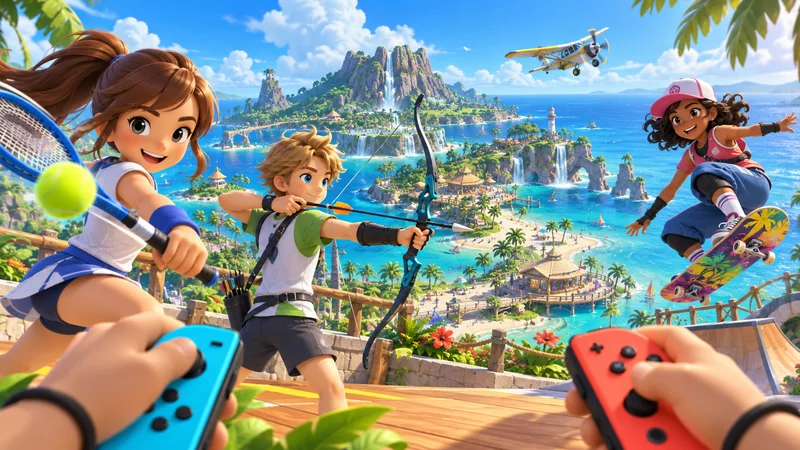
Switch Sports Resort launches on October 22, 2026, exclusively for Nintendo Switch 2. The new island sports game combines twelve activities with solo challenges, local multiplayer and online competition. If you are planning a first-night family session, a little preparation will make the opening much smoother than discovering controller or space requirements after everyone arrives.
This launch guide separates confirmed features from practical setup advice. It is based on Nintendo’s announcements and product information, rather than a hands-on review or a promise about the game’s quality.
Switch Sports Resort at a glance
- Release date: October 22, 2026.
- System: Nintendo Switch 2.
- Activities: twelve motion-control sports.
- Local play: up to four players on one system.
- Online features require a Nintendo Account, internet access and Nintendo Switch Online.
1. Know which sports are included
Nintendo lists Archery, Basketball, Bowling, Boxing, Golf, Power Cruising, Prop Plane, Table Tennis, Tennis and Volleyball alongside newcomers Skateboarding and Thumb Wrestling. These offer different tempos, from measured aiming to quicker competitive exchanges.
For a mixed-experience group, start with two activities whose basic goals everyone already understands. Rotate the choice afterward so one experienced player does not decide the entire evening. A short introductory round gives newcomers room to learn without feeling that every mistake determines a tournament.
2. Check your controller setup before guests arrive
Multiplayer can require extra accessories. Check the selected sport’s current controller instructions and the number of people playing before buying additional hardware. Charge the controllers you plan to use, attach the appropriate wrist straps and keep the tutorial available for each new participant.
Skateboarding uses Joy-Con 2 mouse controls, according to Nintendo’s sports overview. Prepare a suitable surface for that activity rather than assuming every event uses the same swinging motion. Read the on-screen instructions when changing sports, particularly if children and adults share controllers.
3. Make room for motion controls
Clear enough space for everyone to move safely, including room beside and behind each player. Move drinks and fragile objects away from the playing area. Nintendo specifically advises wearing wrist straps and being aware of your surroundings.
Choose a camera and television position that lets people watch without standing inside another player’s swing area. If space is limited, take turns. A slightly slower rotation is better than trying to fit too many moving players into a narrow room.
4. Use Island Crown for solo progression
Island Crown is the single-player-focused mode, with challenges against Island Champions and Legends across nine sports. Nintendo includes Matt among those opponents. It gives solo players a structured goal while they become familiar with the controls.
Set a small target for the first session: complete a tutorial, attempt a few challenges and identify one sport to revisit. You do not need to learn all twelve activities at once. Keeping a short note of the skill that felt difficult can make the next practice session more useful.
5. Plan online play around the actual mode
The announced options include a Friend Lobby, casual online matches and the ranked Pro League. Nintendo describes private lobbies for up to eight players, with up to two per system. Confirm each participant’s access and the chosen sport before scheduling a group session.
Start with a relaxed match when your group is learning. Competitive results become more meaningful after everyone understands the controls and has had a chance to practice. If one participant has connection trouble, keep a local or solo alternative ready while the issue is resolved.
6. Leave time to explore the island
Switch Sports Resort also offers ways to explore Wuhu Island by water, skateboard and plane. Nintendo’s launch information mentions sightseeing, hidden flowers and Spocco Photos. This gives players an alternative when they want a break from consecutive matches.
Build that change of pace into a longer session. A few quiet minutes of exploration can make a family evening more welcoming for someone who enjoys the setting but is less interested in head-to-head competition.
7. Choose a format with a first-session plan
Before purchasing, compare the edition, included contents and regional listing rather than relying on a headline price from another country. If you choose a download, allow time for installation. If you choose a physical copy, inspect the package’s requirements and any additional download information.
Our existing platform guides cover related console questions, while the gaming guides hub collects practical advice for getting started.
Your launch-night checklist
Pick two sports, confirm accessories, charge controllers and clear the play space. Let each player try the tutorial, then agree on a simple rotation. Switch Sports Resort has several ways to play, so build the evening around the people present instead of rushing through every menu.
Check the official Nintendo product page for current requirements and the official sports overview for the activity list and control details.